
Android TV Remote App
Use TVBuddy as an android tv remote for compatible Android TV and Google TV devices. If you are searching for an app remote android tv solution, check both your TV operating system and your phone platform before pairing.
Lost the remote or tired of switching between controllers? TVBuddy is a Universal TV Remote App that turns your phone into a convenient remote for compatible smart TVs. Connect over Wi-Fi, navigate menus, control supported functions, launch apps, and cast personal media from one simple mobile interface.
Whether you need an android tv remote app, a tv remote control app, or a backup remote for tv use, TVBuddy helps keep essential controls close at hand.

✓Free to download. Optional paid upgrades. Features vary by television model, operating system, phone platform, and plan.
Why TVBuddy
TVBuddy combines remote control and media casting in one smart tv remote app designed for everyday use. Instead of searching for a missing controller, use the phone you already have nearby.
Designed for households with multiple compatible televisions, TVBuddy keeps everyday controls in one place without requiring a separate interface for each room.
Use directional controls to browse menus, move between options, return to the previous screen, and control supported playback functions. TVBuddy works as a tv remote mobile app for compatible televisions after pairing.
With the Universal TV Remote App, you can connect to supported TVs, move through menus, use compatible touchpad or keypad controls, access supported apps, and share photos, videos, and music on the big screen.
TVBuddy is designed to work across multiple supported television brands and operating systems. “Universal” does not mean every television is supported, so always check your model and platform before upgrading.
Use TVBuddy as an android tv remote for compatible Android TV and Google TV devices. If you are searching for an app remote android tv solution, check both your TV operating system and your phone platform before pairing.
TVBuddy supports selected TCL televisions running Android TV or Google TV. The tcl tv remote app experience depends on your exact model, operating system, and available controls.
Selected Hisense VIDAA and Google TV models may be supported. If you are looking for a hisense smart tv remote app, verify your specific model before relying on advanced controls.
TVBuddy supports selected Samsung TV models using compatible Tizen versions. Available functions can vary by model and may require approval on the TV during initial pairing.
Selected LG TV models running compatible webOS versions can connect to TVBuddy. Check the model and operating system to confirm supported controls.
TVBuddy supports selected ROKU TV devices and Roku-based televisions. Available navigation and app controls vary by model and platform.
Use TVBuddy as an android tv remote for compatible Android TV and Google TV devices. If you are searching for an app remote android tv solution, check both your TV operating system and your phone platform before pairing.
TVBuddy is designed to provide a universal smart tv remote experience across multiple supported platforms while keeping the controls familiar from one television to another.
Inside the app
Everything you need to control, cast, and connect — all from your phone.
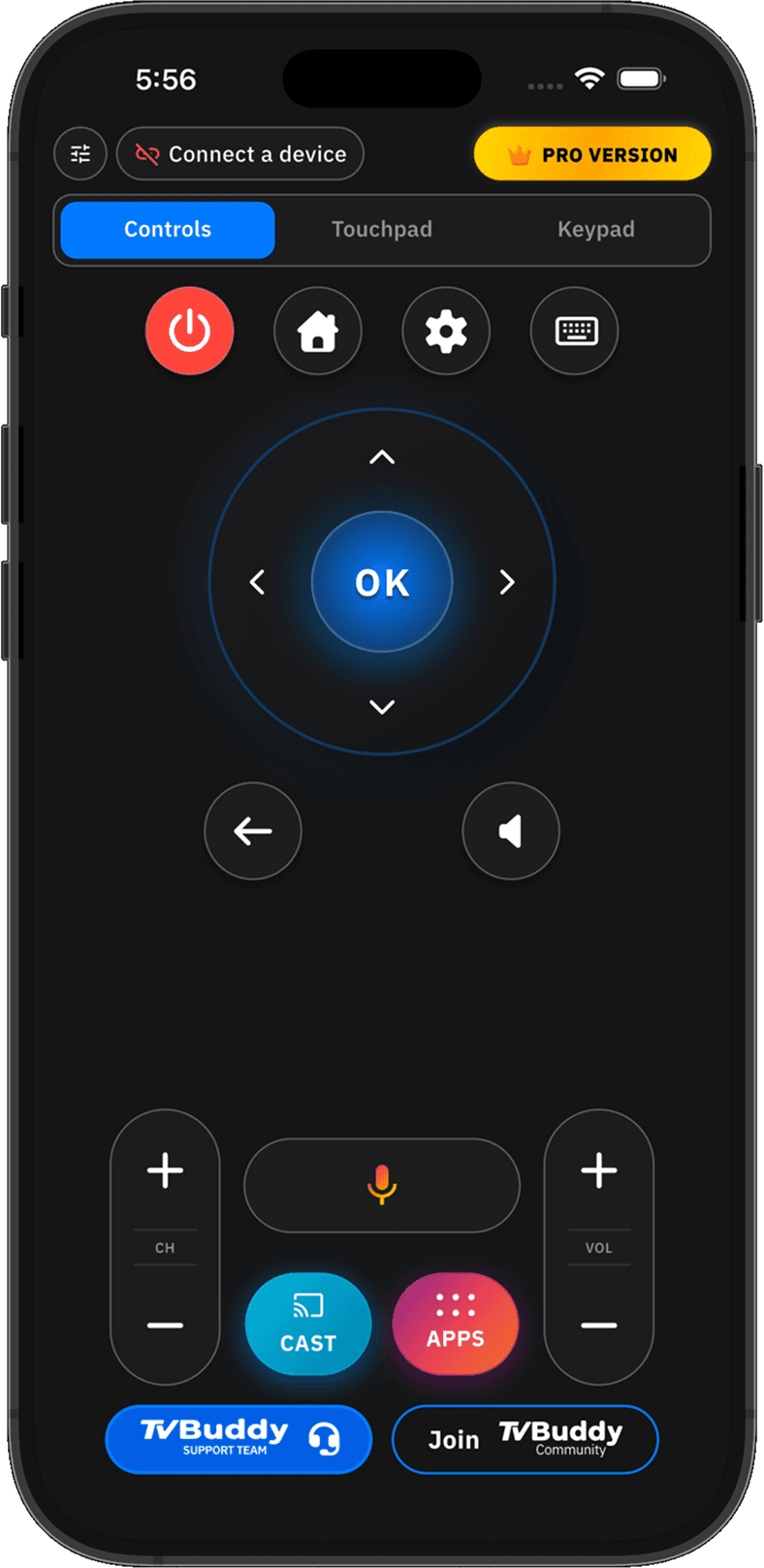
Turn your phone into a TV remote control mobile app for everyday viewing.
Available Controls
Pro Controls
If you need an app for smart tv remote control, start by checking whether your model supports the functions you use most often.
One app · Every room
Different rooms can have different TV brands. TVBuddy is designed as a universal tv app remote for multiple supported platforms, so you can manage compatible televisions from one familiar interface.
Whether you need a smart tv remote app, android tv remote app, tcl tv remote app, or a tv remote control app for another compatible television, TVBuddy keeps everyday functions within reach.
Download TVBuddy








"TVBuddy works exactly as advertised. The app connects quickly to my TV and the remote controls are very responsive. I especially like the clean interface and how easy it is to switch between features. The AI support is also helpful when you need quick assistance. Overall, a very reliable app and definitely worth installing."
"TVBuddy works perfectly with my Smart TV. The remote is responsive, casting is smooth, the interface is very easy to use. Highly recommended"
"TVBuddy is a very useful app for controlling and casting to my TV. The connection is fast and the interface is simple to use. I like how easy it is to mirror my phone screen and control playback without needing multiple remotes. It works smoothly and makes watching content more convenient."
"It is a very useful app to use as a wireless remote for smart tv pa add na din neto"
"TVBuddy works exactly as advertised. The app connects quickly to my TV and the remote controls are very responsive. I especially like the clean interface and how easy it is to switch between features. The AI support is also helpful when you need quick assistance. Overall, a very reliable app and definitely worth installing."
"TVBuddy works perfectly with my Smart TV. The remote is responsive, casting is smooth, the interface is very easy to use. Highly recommended"
"TVBuddy is a very useful app for controlling and casting to my TV. The connection is fast and the interface is simple to use. I like how easy it is to mirror my phone screen and control playback without needing multiple remotes. It works smoothly and makes watching content more convenient."
"It is a very useful app to use as a wireless remote for smart tv pa add na din neto"
Choose your level
Choose the level of control that fits your needs. Start with TVBuddy Free or upgrade to Pro for additional features.
The free version includes:
The Free version is a practical starting point if you want a free tv remote control app for basic navigation or want to test compatibility before upgrading.
Upgrade the Universal TV Remote App to unlock more advanced controls on supported devices.
Pro features include:
TVBuddy Pro is designed for users who want a more complete remote experience from their phone. Feature availability depends on your television, operating system, and device compatibility.
Flexible access
Unlock the full TVBuddy experience with the plan that best matches how you use your Universal TV Remote App.
Best for: Users who want short-term flexibility without an annual commitment.
Subscribe MonthlyBest for: Regular users who want a lower effective monthly cost.
Subscribe YearlyBest for: Users who prefer a one-time purchase for long-term use.
Get Lifetime AccessSetup
Make sure your smartphone and compatible TV are connected to the same local Wi-Fi network.
Launch the Universal TV Remote App and discover nearby compatible devices.
Choose your television from the available device list.
Once connected, try the available free controls and confirm that the features you need work with your specific TV before purchasing an upgrade.
Quick fixes
If your TV is not appearing in the app, check the following:
Phone and TV must be on the same Wi-Fi network.
VPN must be disabled for device discovery.
TV must be fully powered ON, not in standby.
Guest Wi-Fi may block discovery protocols.
TVBuddy is free to download and includes basic remote features. Optional Pro plans unlock additional controls and features. Not every feature is available in the free version.
Ready when you are
Keep your TV controls close, even when the physical remote is missing. With TVBuddy, you can connect to compatible televisions, navigate menus, use supported advanced controls, launch apps, and cast personal media from your phone.
Check your television compatibility, choose the plan that fits your needs, and download the Smart TV Remote App for iPhone or Android.
Check your television compatibility and choose the plan that fits your needs. Free to download. Optional paid upgrades.
Hi there!
How can we help you with your Smart TV today?